How do I add a remote QCS site?
The following assumes you have already installed and setup at least one computer for this contract which is the Master Site computer. The Master Site computer is the one site you have in your company for this contract that imports and exports to RMS . All other sites will import and export only to QCS. The master site is the only site that has the ability to add, edit, and delete remote QCS sites.
To add a remote site follow these directions:
- Install QCS on the computer that is to become a remote QCS site. See our FAQ How do I install QCS? for information on how to install QCS.
- Find the site ID for the remote QCS site that was created in step 1 and note it. See our FAQ How can I find my site ID?.
- To add this remote Site ID to the list of sites that the Master Site has available for this contract perform the following steps at the master site:
- Open the contract that you wish to add the remote site to.
- Open the "Import/Export | QCS" module.
- In the workspace area you will see the checkbox Will QCS be used at a remote QCS site? as shown in the screen shot below. If it is not checked please place a checkmark by clicking on the checkbox. This will display a button [QCS Sites] button to the right of the checkbox.
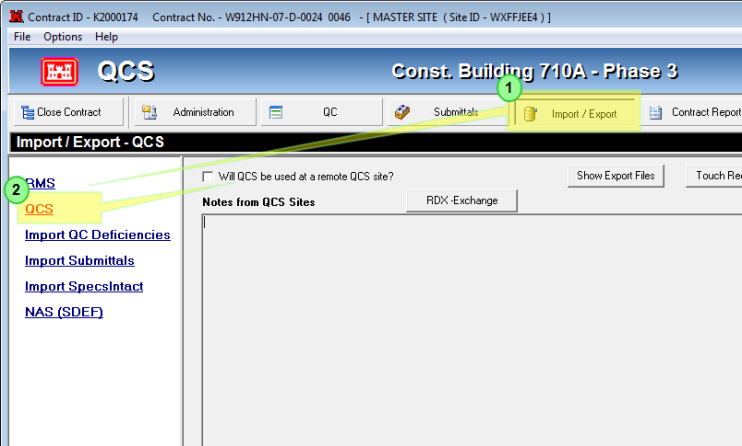
- Click on the [QCS Sites] button. This will open the QCS Sites window shown below:
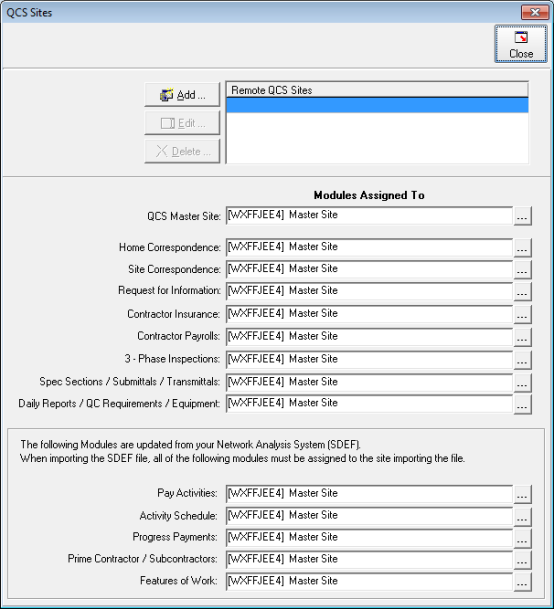
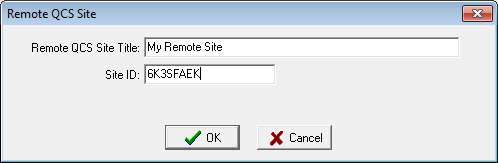
- At the top of the QCS Sites window click [Add] and enter a name and ID for the site as shown below. The name is just a temporary until you perform an import from the remote site where the name you have entered here will be replaced by the name used by the remote site. Once you are done click [OK].
- Once you have added the remote site you may then assign modules
- At the bottom of the "Import / Export | QCS" module click on the [Export to QCS] button. After the export has finished contact the remote site to inform them that the contract may be added.
- The remote site may now add the contract. See our FAQ titled How do I add a contract to QCS? for more information on how to accomplish this.